Technical SEO in Dubai is the work that makes sure search engines can access, understand and index the right parts of a website without unnecessary barriers.
Technical SEO works best as part of a broader digital marketing strategy in Dubai, where search visibility, content and conversion paths support the same business goals.
Good content can underperform when crawling is blocked, duplicate URLs compete with each other, internal links are weak, canonical tags point to the wrong page, or a redesign introduces redirect and indexing problems.
This checklist explains the technical areas I review as part of my SEO services in Dubai.
Start With Google’s Minimum Technical Requirements
Google’s Search Central documentation describes three minimum technical requirements for a page to be eligible for indexing: Googlebot must not be blocked, the page should return a successful HTTP status, and the page must contain indexable content.
Meeting those requirements does not guarantee indexing or rankings, but failing them creates a technical barrier before content quality is even considered.
You can review Google’s official technical requirements for Google Search.
1. Crawlability
The first question is whether search engines can discover and request the important URLs.
I check:
- robots.txt rules
- XML sitemap availability
- Internal links to key pages
- Orphan pages
- Navigation structure
- Accidental crawl blocks
A robots.txt file can prevent crawling, but it is not the correct tool for removing a page from Google. Pages that should not be indexed normally need an appropriate noindex strategy while remaining crawlable where required.
2. Indexability
A page can be crawlable and still not be indexable.
Common problems include:
- noindex tags on important pages
- Canonical tags pointing elsewhere
- Soft 404 pages
- Redirect chains
- Duplicate content
- Thin or low-value URLs
Search Console’s Page Indexing and URL Inspection reports are useful for understanding what Google is actually doing with individual URLs.
3. XML Sitemaps
An XML sitemap helps search engines discover important URLs and understand when pages were updated. It should contain canonical, indexable pages rather than every URL the CMS can generate.
I normally check whether the sitemap contains:
- Published service pages
- Important articles
- Useful category archives
- Correct canonical URLs
Utility pages, duplicate archives and noindex pages should not be treated as important sitemap entries.
4. Canonical Tags
Canonical tags help search engines understand which URL should represent a set of duplicate or very similar pages.
Problems can appear when:
- The canonical points to the wrong URL
- HTTP and HTTPS versions conflict
- Trailing-slash variants compete
- Parameter URLs are indexed unnecessarily
- A staging domain is accidentally referenced
For normal service and article pages, I want the canonical to point to the clean live URL unless there is a deliberate reason to consolidate elsewhere.
5. Redirects and URL Changes
When a slug changes, the old URL should normally redirect to the new equivalent so users and search engines do not hit a dead page.
During migrations or redesigns, redirect planning becomes especially important because old URLs may already have rankings, backlinks and historical signals.
Avoid long redirect chains. One clean redirect from the old URL to the final destination is easier to maintain.
6. Internal Linking and Site Architecture
Internal links help users navigate and help search engines discover relationships between pages.
A useful architecture usually connects:
- Homepage to primary services
- Service pages to relevant supporting content
- Articles back to the appropriate service page
- Related articles to each other
- Category hubs to topic clusters
This is the same hub-and-cluster structure I am using across my own Digital Marketing and SEO content.
7. Core Web Vitals and Page Performance
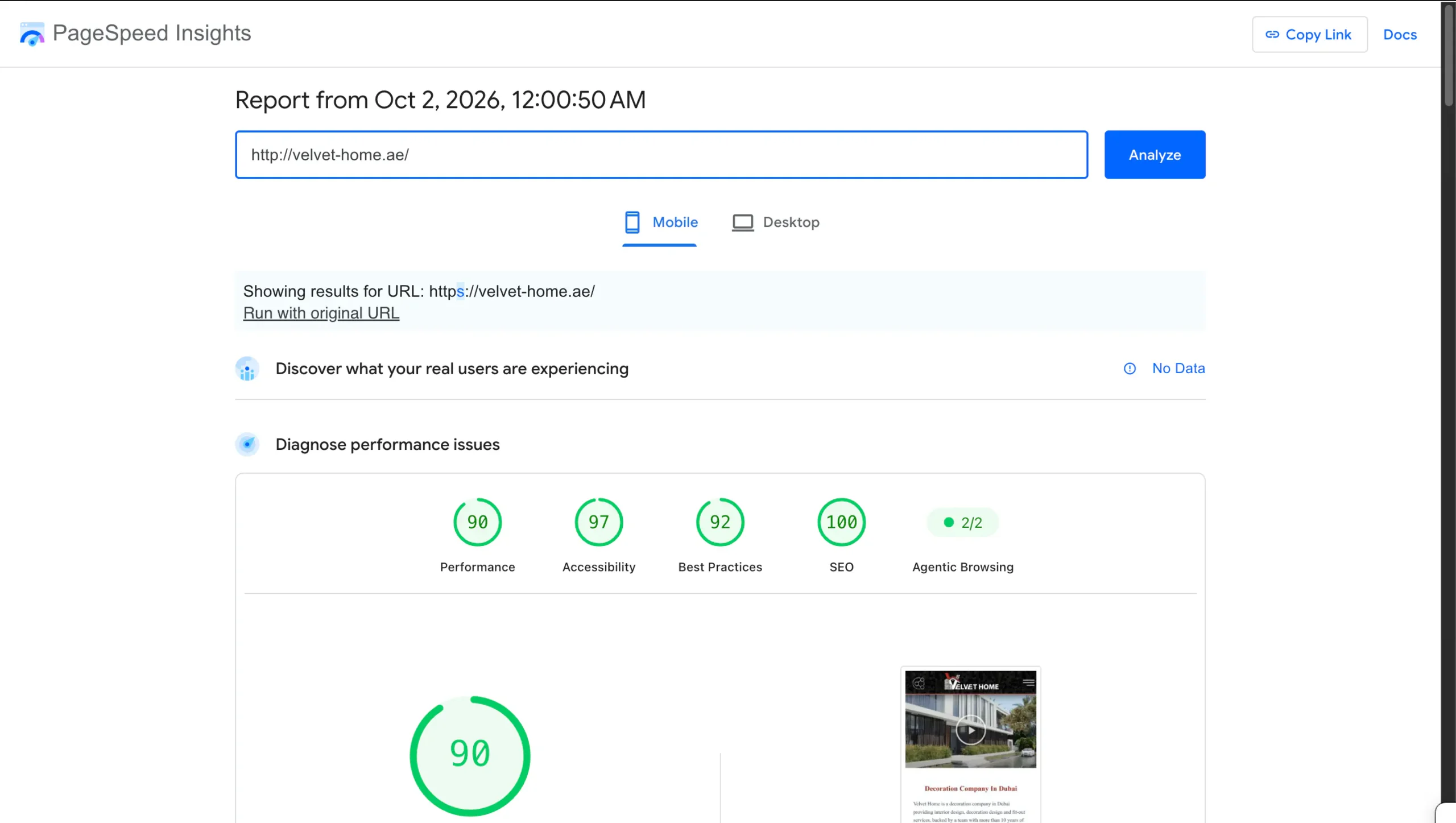
The same PageSpeed evidence is included in my Dubai SEO case study, alongside the site’s 8.42K Search clicks and 476K impressions over six months.
Speed is part of user experience, but technical SEO performance work should not be reduced to chasing a single Lighthouse score.
I review:
- Largest Contentful Paint
- Interaction to Next Paint
- Cumulative Layout Shift
- Image size and format
- JavaScript and CSS weight
- Font loading
- Caching
- Server response
The featured image on this article comes from a real mobile PageSpeed Insights report in my portfolio showing a 90 performance score and 100 SEO score for a client website. The useful part is not the screenshot by itself; it is the technical work behind a stable, fast page.
8. Mobile Rendering
Google uses mobile crawling as the default. Important content, links and structured data should be available on mobile rather than hidden behind a desktop-only experience. The same technical foundation also supports AI SEO and Google AI Overview visibility, because AI-powered search still depends on crawlable, understandable web content.
I check mobile layouts for:
- Missing content
- Overlapping elements
- Unusable navigation
- Slow hero images
- Font-loading issues
- Tap targets and forms
9. Structured Data
Structured data can help search engines understand the meaning of content and can make pages eligible for certain search features when the markup matches Google’s requirements.
Common schema types include:
- Organization or Person
- Article
- BreadcrumbList
- Product
- LocalBusiness where appropriate
Schema should describe real visible content. Adding markup for information that does not exist on the page creates more risk than value.
10. Hreflang for English and Arabic Websites
UAE websites often publish both English and Arabic. Hreflang helps search engines understand localized language versions of equivalent pages.
I check that:
- English and Arabic pages reference each other
- URLs are indexable
- Canonicals do not conflict with hreflang
- Language versions are actually equivalent
For bilingual sites, technical SEO has to work together with localization rather than treating Arabic as an afterthought.
11. HTTP Status Codes
Important pages should normally return HTTP 200. Broken URLs may return 404 or 410. Redirected URLs return 3xx.
Unexpected status codes can affect crawling, indexing and user experience, so I review them during audits and migrations.
12. JavaScript Rendering
Modern websites can render important content with JavaScript. Google can process JavaScript, but unnecessary rendering complexity can still create crawl and debugging problems.
Key headings, links and service copy should not depend on fragile interactions if they can be delivered directly in the initial page output.
13. Search Console Monitoring
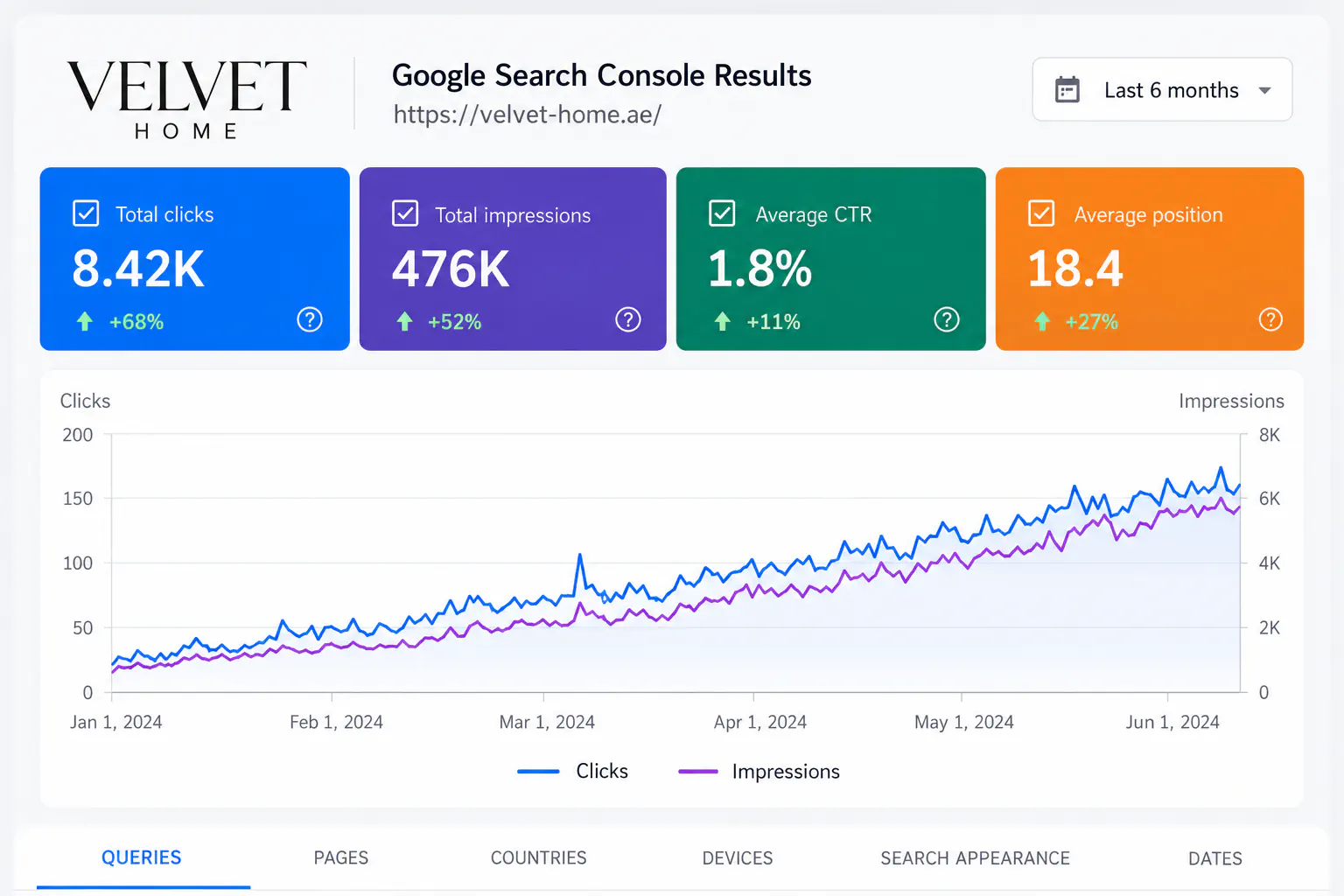
Technical SEO is not a one-time checklist. Search Console helps monitor:
- Indexing changes
- Crawl issues
- Search queries
- Page performance
- Core Web Vitals
- Manual actions or security issues
I use this alongside crawling and page-level checks to prioritise the technical problems that actually affect important pages.
Technical SEO vs Local SEO
Technical SEO makes sure the site can be crawled, rendered and indexed correctly. Local SEO focuses more on local relevance, Google Business Profile, reviews and location-based visibility.
For local businesses, the two work together. See my Local SEO Dubai 2026 guide for the local side of the strategy.
How Much Does Technical SEO Cost?
The scope depends on the size and complexity of the site. A small WordPress website may need a focused audit and fixes. A multilingual ecommerce or JavaScript-heavy platform may need ongoing developer collaboration.
For broader pricing context, see my guide to SEO cost in Dubai.
Final Takeaway
Technical SEO should remove barriers between good content and search engines. The best audit is not the one with the longest checklist; it is the one that identifies the problems with the highest real impact and turns them into fixes that can actually be implemented.
If you need a technical review of a WordPress, Shopify or custom website, see my SEO services in Dubai or contact me with the website details.

Ali Alkhatib
Informatics Engineer and digital professional working across web development, SEO, Flutter applications and digital growth in Dubai, UAE.